WordPress plugin for annual event calendars

AnnoVisio
A Full Year of Events at a Glance

Show a full year of events on your WordPress site from Calendly or from iCalendar feeds used by Google Calendar, Outlook, Microsoft 365, Apple Calendar, iCloud and many other calendar systems.

AnnoVisio brings different event sources into one clear year view. Visitors see public events at a glance, while internal teams can use the Team Portal to see additional calendars for people, rooms, equipment and resources.

Calendly iCalendar / ICS feeds Google / Outlook / Apple Multi-day events Team Portal
Training providers Retreat organizers Schools & academies Teams & resources
1 yearvisible at a glance
Calendlybooking flow remains intact
ICScalendar feeds as sources
Teaminternal organization in Pro
Core idea

One annual overview for your event sources

AnnoVisio connects Calendly event types and iCalendar feeds in one WordPress plugin. It turns booking events, public calendars and selected internal calendars into a clear annual view.

Calendar sources

  • Calendly for booking-based events, courses, workshops and multi-day programs
  • iCalendar / ICS feeds from Google Calendar, Outlook, Microsoft 365, Apple Calendar, iCloud and similar tools
  • Existing calendars remain the source of truth for teams and organizations

Annual presentation

  • Clear year calendar for public event schedules
  • Multi-day events remain visible across multiple days
  • Calendly events can lead visitors into the Calendly booking flow
  • Calendar-feed events can show details and links from the source calendar
Public calendar + internal organization

Show the event year outside. Organize resources inside.

The public calendar can focus on events, seminars and bookings. The Team Portal can add internal calendars for people, rooms, vehicles, equipment or other resources that should only be visible to logged-in users.

Public annual view

A compact event overview

Use the annual calendar to make courses, workshops, retreats, trainings and public schedules easier to understand.

Year viewShortcodeMulti-day
Team Portal

Internal calendars for logged-in users

Limit individual calendars to the Team Portal and combine public events with team availability or resource calendars.

PeopleRoomsEquipment
Larger setups

Multiple calendar areas

Create separate annual views for different departments, event types, locations or websites when the schedule grows.

ShortcodesCategoriesList view
Example use case

Training school with external instructors

A school can publish its course dates in the public annual calendar. External instructors keep their availability in their own Google, Outlook or Apple calendars. AnnoVisio reads those calendar feeds and shows the availability in the Team Portal.

This keeps each person in their preferred calendar tool while the organization sees one shared overview inside WordPress.

EventsInstructor availabilityResource planning
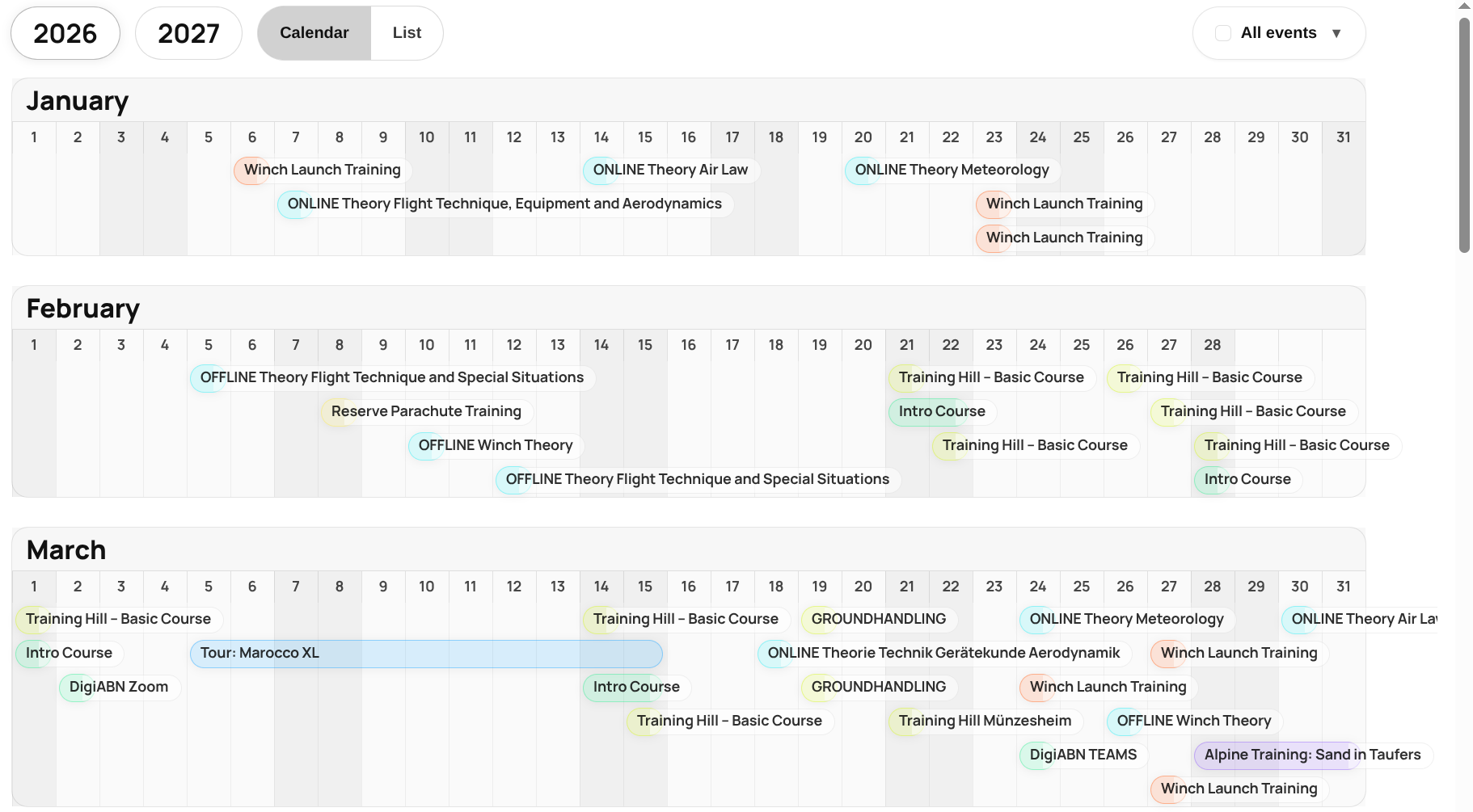
AnnoVisio calendar source setup in WordPress
Setup guidance

Start simple, then structure larger setups when needed

Free is suited for one compact public annual overview. Pro is designed for multiple annual views, larger calendar setups and internal team organization.

Compact public calendar

Use one shortcode, one calendar source and one Calendly connection to publish a focused annual overview on a WordPress page.

  • Good starting point for a single event calendar
  • Calendly or iCalendar feed as source
  • Annual view with multi-day event display

Further possibilities

Learn how AnnoVisio can be used for multiple calendar areas, trainings, events and team portals.

  • Several event calendars or departments
  • Separate public and internal calendars
  • Categories, colors and list view for larger schedules
Live Demo

See the annual view in a real WordPress setup

The demo shows a Calendly-based setup for a training business. The same annual view can also include iCalendar feeds from Google Calendar, Outlook, Microsoft 365, Apple Calendar, iCloud and similar tools.

Free and Pro

Choose the setup that matches your organization

Free focuses on one public annual calendar. Pro supports larger calendar structures and internal team coordination.

AreaFreeProTypical use
Public annual overviewOne shortcodeMultiple shortcodesSeparate event areas, departments or pages
Calendar sourcesOne calendarUnlimited calendarsEvents, team members and resources
Calendly connectionsOne connectionUnlimited connectionsSeveral booking calendars or organizers
Multi-day eventsIncludedIncludedRetreats, courses, seminars, travel and trainings
Team PortalCompact public setupIncludedInternal availability and resource planning
Categories, colors and list viewSimple annual viewIncludedLarger schedules that need more structure
AnnoVisio

Make your event year easier to understand

Use Calendly, iCalendar feeds or both to build a structured annual calendar for WordPress.