WordPress Plugin for Calendly

AnnoVisio
A Year Calendar with Multi-Day Events for Calendly

Turn Calendly into a year calendar for WordPress with multi-day events and direct booking links.

No complicated setup. Connect Calendly, sync your events, and publish a structured yearly overview in WordPress. All you need for multi-day events is a hashtag in the event description.

New in AnnoVisio 10 languages supported

Promote your event calendar internationally with localized plugin support, including English in both UK and US variants.

  • Deutsch
  • English (UK)
  • English (US)
  • Español
  • Français
  • Português (Brasil)
  • Italiano
  • Nederlands
  • 日本語
  • Polski
  • Türkçe
Calendly sync Year calendar view Multi-day events Direct booking links WordPress shortcode-ready
Training providers Retreat organizers Workshops & seminars Tours & travel businesses
1 yearvisible at a glance
Multi-dayevents shown clearly
Directbooking through Calendly
Shortcodesready for WordPress pages
Problem / Solution

Calendly booking, now organized as a real annual event calendar

Calendly is strong for booking. It is not built to present an annual overview with multi-day event logic in this format. AnnoVisio adds the year calendar presentation layer and multi-day event handling on top.

Without AnnoVisio

  • Separate booking links are hard to scan across a full year
  • No structured annual overview for many dates
  • Multi-day events are not presented as spanning events in this format
  • Visitors need more clicks to understand the schedule

With AnnoVisio

  • One clear year calendar for the whole event schedule
  • Multi-day events become visually obvious
  • Visitors can browse first and book directly through Calendly
  • WordPress-ready output for a more professional event website
Benefits

Built for clarity, not clutter

A practical product site should make the benefit obvious in seconds: show many dates, make multi-day events easy to understand, and keep booking simple.

01

Make a full year easy to browse

Visitors can scan dates, formats, and timing in one structured annual overview.

02

Show multi-day events clearly

Retreats, seminars, tours, and training blocks stand out across multiple days.

03

Keep booking inside Calendly

Improve presentation in WordPress while keeping the familiar booking flow.

04

Reduce setup friction

Connect, sync, publish. The workflow should feel practical and lightweight.

05

Support larger event catalogs

Use categories, views, and filters when your schedule grows across the year.

06

Build trust through structure

A professional annual schedule feels more complete than scattered booking links.

Who it’s for

Built for event-based organizations with many dates to show

TP

Training providers

Present recurring programs, cohorts, and multi-day trainings across the year.

RO

Retreat organizers

Display retreats as spanning events and send visitors straight to booking.

WS

Workshop hosts

Show upcoming workshop dates in a format people can actually scan.

SA

Schools & academies

Organize term dates, intensives, and programs in a clean annual view.

TT

Travel & tours

Highlight multi-day travel events and seasonal offerings across one calendar.

EB

Event-based businesses

Create a more structured public schedule without replacing Calendly.

Features

Clear event calendars lead to faster bookings

Calendly Sync

Connect Calendly and keep event data in sync

Keep the source of truth inside Calendly while the WordPress front end stays organized and easy to browse.

  • Simple connection flow
  • Sync status visible in the UI
  • Supports a scalable event structure
Connected Sync status Scalable setup
Multi-Day Events

Add multi-day logic on top of Calendly

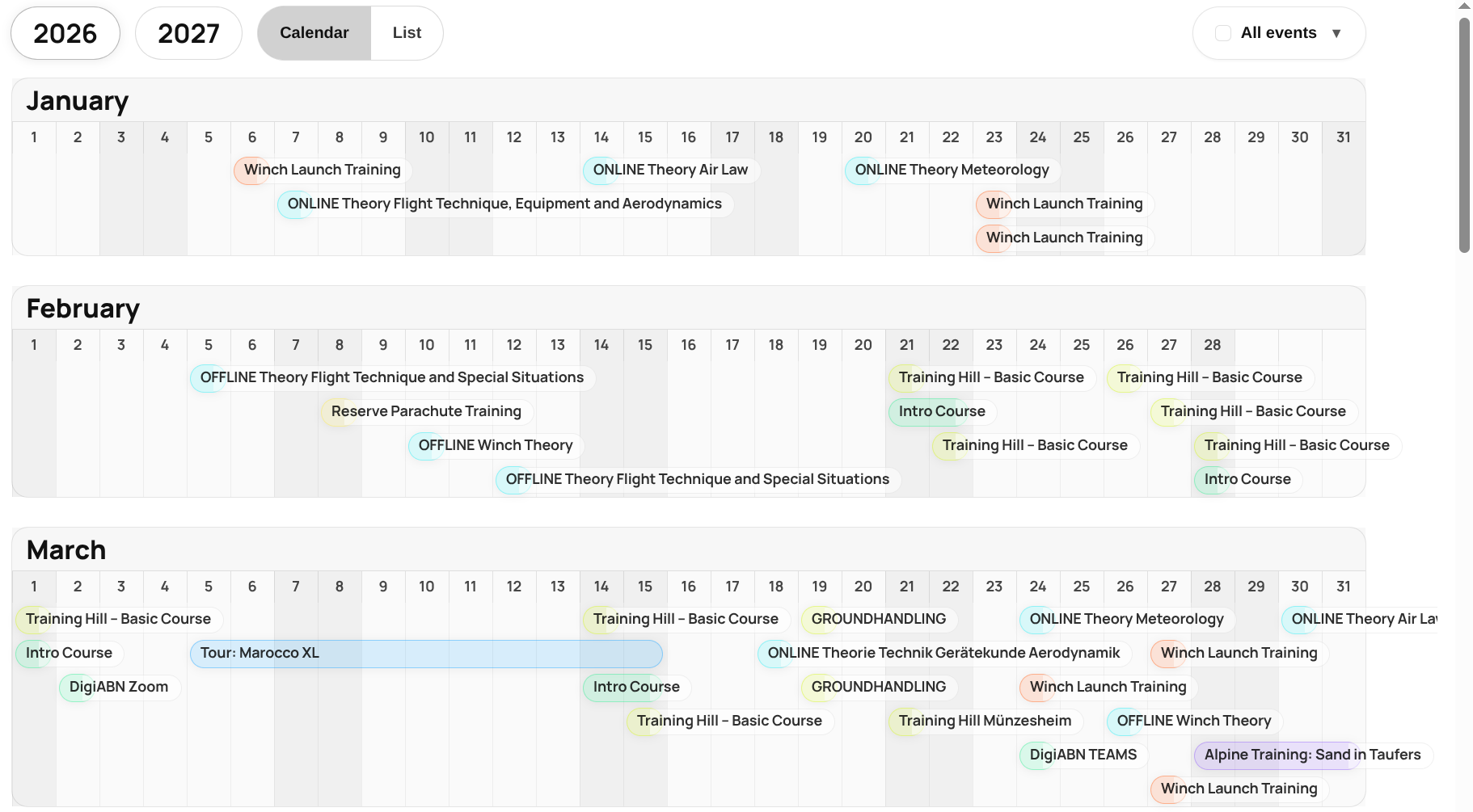
The plugin adds the missing presentation logic so longer events appear as spanning entries in the year calendar.

  • Multi-day display layer built for annual schedules
  • Simple hashtag-driven setup
  • Fast visual understanding for site visitors
#multiday Annual schedule Fast overview
Views & Filters

Make large event catalogs easier to navigate

Use calendar views, list view, categories, and filters to help visitors find relevant dates quickly.

  • Year calendar view
  • List view for scanning
  • Categories and filters in Pro
Year view List view Categories
Live Demo

See AnnoVisio in a real WordPress setup

Live example from a paragliding school. Browse the live plugin demo directly on this page. Open the full demo for a larger view and a more comfortable walkthrough.

Free vs Pro

Choose the setup that fits your calendar

Start free, upgrade for more calendar views, sources, filters, and layouts.

Feature Free Pro Business / Enterprise
Calendly sources1MultipleOrganization-wide scale
Year calendar views1UnlimitedUnlimited
Event typesUnlimitedUnlimitedUnlimited
Multi-day eventsIncludedIncludedIncluded
Booking via CalendlyIncludedIncludedIncluded
Categories and filtersIncludedIncluded
List viewIncludedIncluded
Additional layoutsIncludedIncluded
SupportStandardPriorityPriority + onboarding
Pricing

See plans and pricing on the dedicated pricing page

Free and premium plans are available.

FAQ

Common questions, answered clearly

Does Calendly provide this year calendar layout natively?

No. AnnoVisio adds the multi-day event logic and year calendar presentation layer on top of Calendly inside WordPress.

Do visitors still book through Calendly?

Yes. The plugin improves the browsing experience while booking continues through Calendly.

How do multi-day events work?

Multi-day events are triggered using a simple hashtag convention in the event description, then displayed across multiple days in the calendar.

Year-at-a-Glance

Turn Calendly into a clear annual event calendar

Show multi-day events, organize dates across the year, and let visitors book directly through Calendly.

Free plan available. Business onboarding available.